
Video & Website Approvals: Clearer, Faster Feedback for Digital Content
Digital content has become one of the most complex and high-volume areas of marketing production. Websites, landing pages, banners, interactive HTML, animations, GIFs and video content all require structured review — often involving marketing, creative, product, legal and compliance teams.
But reviewing digital formats is not easy. Unlike static assets, website pages change dynamically. Video frames move too fast to annotate. Screenshots live in inboxes. Feedback becomes fragmented. Version control becomes unreliable. Submissions become slow.
Admation’s Video & Website Approvals feature solves this challenge by giving teams a centralised, purpose-built process for capturing feedback on dynamic digital assets. Whether you’re reviewing a live website, a landing page, a web animation or a video, Admation provides snapshot capture, annotation tools, timestamp tracking, version management and a structured approval workflow — all in one place.
This feature is ideal for marketing teams, digital teams, creative agencies, UX teams, compliance reviewers and any organisation managing digital content across multiple channels.
What Problem Does Video & Website Approvals Solve?
Digital content reviews are significantly harder than static artwork reviews. Without a unified system for website and video approval, teams face workflow gaps, duplicated feedback and avoidable rework.
Problems Video & Website Approvals Solve:
- Fragmented Digital Feedback
Comments for websites and video content are scattered across emails, PDFs, screenshots and messaging apps — making it difficult to consolidate and action changes consistently. - Unclear Web Page and Video Annotations
Website elements cannot be easily marked up, and video frames move too quickly for reviewers to reference, leading to vague or incomplete feedback. - Incorrect or Outdated Versions
Teams often review the wrong version of a website or video because snapshots are stored separately from other creative assets. - Slow Digital Review Cycles
Reviewers cannot easily identify where feedback belongs, forcing teams into multiple back-and-forth cycles that delay campaign delivery. - Compliance Vulnerability
Regulated content (financial disclosures, product claims, T&Cs) often appears in digital channels, and email-based feedback does not meet audit or governance standards. - Inefficient Multi-Stakeholder Collaboration
Different teams use separate tools for feedback, causing misalignment between marketing, creative, product, legal and compliance teams. - Difficulty Reviewing Interactive Web Content
Web pages that update dynamically, include pop-ups or rely on interaction cannot be easily reviewed without a specialised tool. - High-Volume Digital Workflows Cannot Scale
Increasing volumes of video and digital content make manual processes unsustainable and error-prone.
Admation centralises digital review, enabling structured feedback, accurate snapshots, timestamped video frames and complete governance for digital approvals.
What Are Video & Website Approvals?
Video & Website Approvals allow users to review and annotate digital content — including websites, landing pages, HTML files, animations, GIFs and video files — inside Admation using a dedicated snapshot extension.
The feature captures clear, accurate screenshots of live content, enabling stakeholders to provide feedback directly on the elements that need attention. Annotations, timestamped video snapshots, comments and decisions are stored within the approval workflow, creating a complete digital audit trail.
This creates a consistent, scalable workflow for digital-first creative teams.
Key Features
Website Rendering & Snapshot Capture
Review live websites inside Admation, navigate pages and take snapshots of specific elements or screens for annotation.

Browser Snapshot Extension
Use Admation’s Chrome, Safari or Firefox extension to capture screenshots of websites, HTML files, GIFs and videos — even when a site does not render inside the proofing window.

Video Snapshot & Timestamping
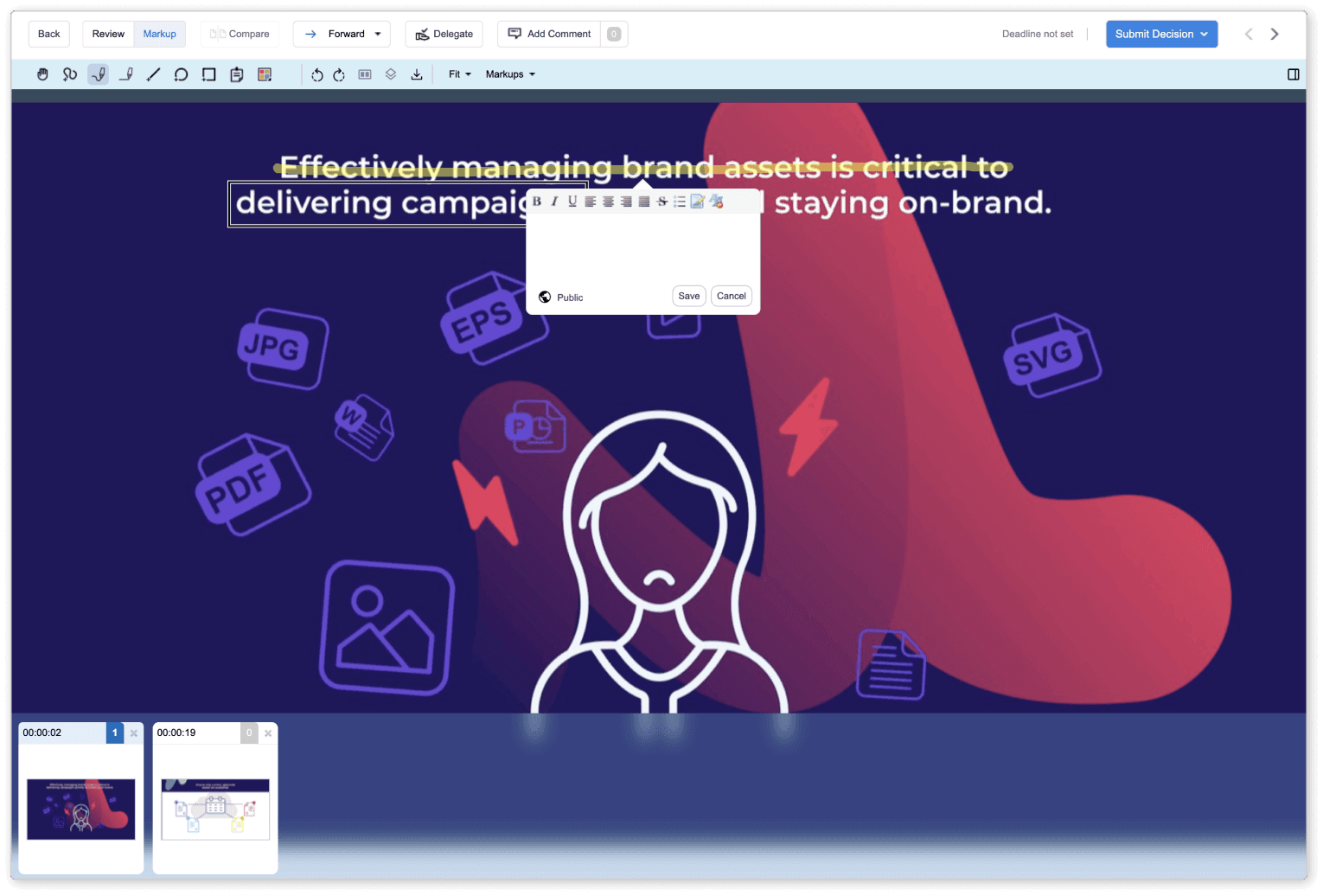
Pause a video at any frame, capture a still image, annotate it and store feedback with exact timestamps for easy reference.

Multi-Snapshot Review Panel
Snapshots appear as thumbnails, allowing teams to step through frames or pages in sequence and review each comment in context.

Markup & Annotation Tools
Add text, shapes, highlights or sticky notes to snapshots for precise feedback on digital elements.

Threaded Comments & Collaborative Discussions
Respond to comments, clarify points and collaborate on annotations within a shared workspace.

Integrated Approval Pathways
Submit digital assets through structured review workflows using Legal, Brand, Compliance, Product or Marketing approval tiers.

Audit Trail & Version Management
Every snapshot, annotation, comment and decision is saved — supporting traceability and compliance.

Support for Video, HTML, GIFs & Web Assets
Review interactive and visual content from multiple digital channels within the same proofing environment.

Key Benefits
Accurate Feedback for Moving & Interactive Content
Snapshots capture exact frames or website elements, giving creative teams precise instructions that reduce confusion and rework.
Faster Digital Approval Cycles
Teams eliminate manual screenshotting, email confusion and re-uploads — streamlining approvals for complex digital assets.
Fewer Errors Across Channels
Clear annotations and version-controlled snapshots ensure that required changes are accurately implemented.
Improved Collaboration Across Digital Teams
Marketing, creative, product and compliance teams review the same content in one environment, reducing duplicated feedback.
Governance for Regulated Content
Timestamped video frames, snapshot history and structured pathways ensure compliant digital content review.
Scalable Review Process for High-Volume Digital Work
Whether reviewing 5 videos or 500 website elements, the workflow remains consistent, clear and auditable.
How it Works
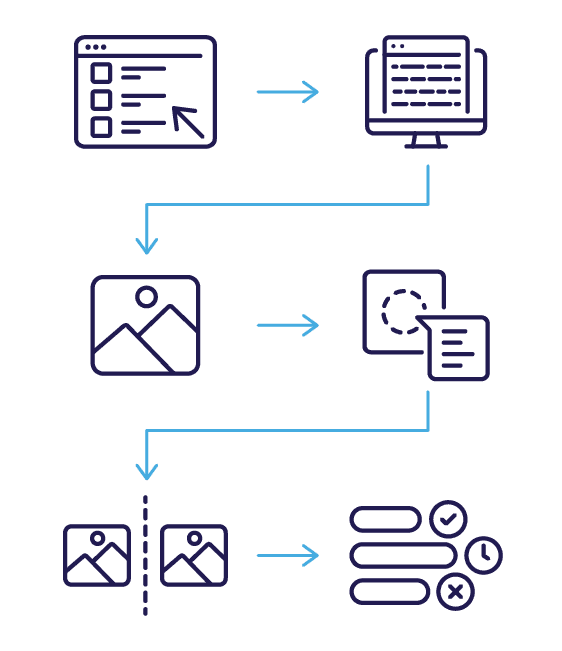
- Upload or Add a Digital Deliverable
Add a video, website URL, HTML file or GIF to a project and submit it for approval. - Open the Website or Video in Admation
View a live website or play a video inside the proofing screen. - Capture Snapshots for Feedback
Use the Take Snapshot button or browser extension to capture stills of specific frames or web elements. - Annotate, Comment & Collaborate
Add markups, threaded comments, sticky notes or references directly on snapshots. - Review and Compare Multiple Snapshots
Switch between frames or web pages to confirm updates, check accuracy and validate feedback. - Approve or Request Changes
Submit your decision through Admation’s structured approval pathways with full audit traceability.
Use Cases
Marketing Teams
Review digital campaigns, landing pages, videos and product content with complete clarity.

Creative & Digital Agencies
Share website and video concepts with clients for structured, version-controlled feedback.

UX & Web Teams
Capture and annotate specific UI elements, flows or interactions during website review.
Compliance & Legal
Verify digital claims, disclosures and regulated content with timestamped evidence.

Retail & E-Commerce Teams
Review high-volume product pages, banners and promotional content.

Challenges Video & Website Approvals Solve
Scattered Digital Feedback
Teams receive screenshots, emails, messages and comments across multiple channels, causing confusion and rework.
Unclear Digital Annotations
Reviewers cannot easily mark up interactive pages or moving video frames, leading to vague and contradictory instructions.
Version Mismatch Across Teams
Digital assets evolve quickly, and stakeholders often review the wrong file or outdated screenshots without a unified workflow.
Slow Multi-Stakeholder Approval Cycles
Digital content requires review by Marketing, Legal, Product, Brand and Compliance — manual processes slow everything down.
Compliance Blind Spots for Digital Assets
Regulated claims within videos or web pages need structured review — email and chat are not audit-ready.
Inability to Capture Dynamic Web Content
Interactive web elements, drop-downs, pop-ups and scrolling experiences cannot be reviewed without specialised tools.
High-Volume Digital Production Overload
Digital-first teams cannot keep up with increasing content volume using manual review processes.