
Version Management: Keep Creative Assets Accurate, Compliant and Under Control
Marketing and creative teams juggle multiple versions of artwork, campaign collateral, documents, digital assets and product content. Without structured version control, teams end up working from outdated files, duplicating work, misinterpreting changes and risking compliance breaches.
Admation’s Version Management feature centralises every creative version in one secure location, making it easy to see which file is current, how the asset evolved and who made what changes. This ensures creative accuracy, brand consistency and governance across every project.
With Admation, marketing teams, agencies and compliance reviewers work confidently from a single source of truth — backed by complete, traceable version history.
What Problem Does Version Management Solve?
Marketing, creative and compliance teams manage constant rounds of changes. Without a structured version management system, it becomes almost impossible to track updates, validate decisions or confirm which version is final.
Version Management solves this by centralising all versions, tracking every revision and ensuring teams always work from the correct, approved file.
Without version management, teams face:
- Version confusion and outdated files
Stakeholders accidentally review or publish the wrong file when assets live across email threads, shared drives, desktops or personal folders. - Untracked changes with no clear history
Teams have no visibility of who changed what, when it was changed or why — making it difficult to validate decisions or identify errors. - Brand inconsistency across channels
Incorrect logos, colours, claims or disclaimers slip through when multiple versions exist and teams cannot confirm which one is correct. - Rework caused by missing or inaccurate feedback
Designers and agencies waste time making changes based on outdated comments because there is no consolidated version history. - Compliance and governance risk
Regulated industries require documented, traceable changes — something impossible to achieve with decentralised or email-based version control. - Duplicate asset creation
Teams unknowingly recreate assets that already exist because earlier versions cannot be easily located or identified. - Inefficient collaboration across teams and agencies
Different stakeholders use different systems, leading to misalignment and lost changes.
Admation brings all creative versions together into a clear, auditable and fully connected workflow — maintaining consistency, compliance and creative accuracy.
What Is Admation’s Version Control (and Version Management) Feature?
Admation’s Version Management provides a complete, automatically tracked history of every creative asset. Each revision is captured, stored and time-stamped, along with details of who updated it and why.
All versions live in a secure central repository, ensuring teams always know which file is final, approved and compliant. Version Management also integrates with Online Proofing, Compare Versions, Approval Checklists and the Audit Trail — supporting a fully traceable and compliant creative approval workflow.
Key Features
Centralised Version Repository
Store all versions of every creative asset in one secure location, ensuring teams work from a single source of truth with full revision continuity.

Automatic Version Creation
Admation automatically generates a new version whenever an update is uploaded — preventing overwritten files, accidental deletions or version conflicts across teams.

Complete Revision History
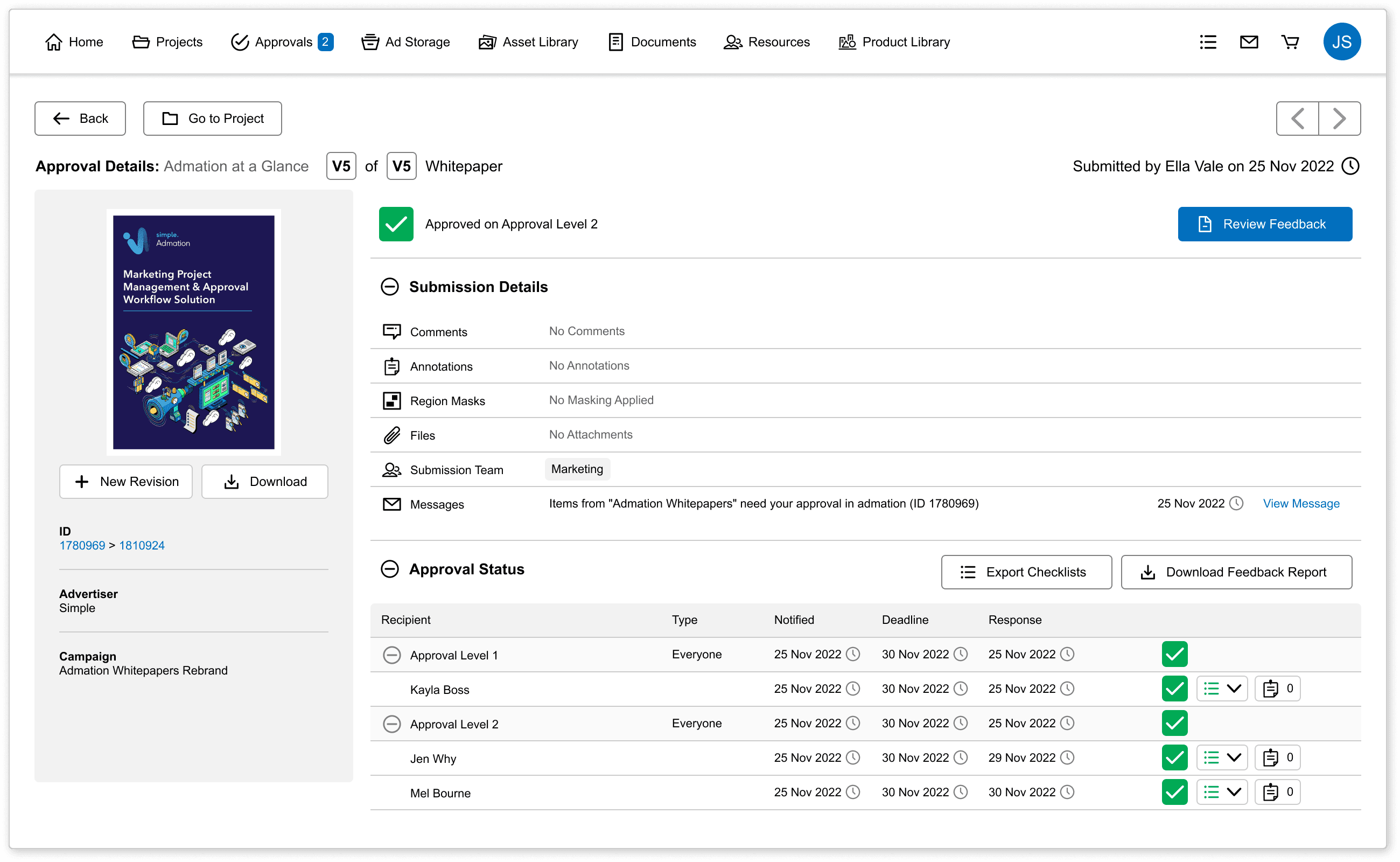
Access a detailed, time-stamped log showing who made updates, what changed and when — supporting accurate governance and audit-ready version tracking.

Side-by-Side Version Comparison
Visually review two versions together to identify differences instantly, confirm feedback implementation and reduce repeated errors.
Integrated Online Proofing Tools
Use markup tools to annotate artwork, highlight required changes and review comments in context, improving clarity and collaboration.
Compliance & Governance Integration
Link version history with approval pathways, audit trails and checklists so every version meets brand, legal and regulatory standards before release.

Batch Approvals for High-Volume Work
Approve sets of related assets together — ideal for digital variants, retail artwork, social content and large campaign rollouts.

Secure, Controlled Access
Define who can upload, update, review or approve specific versions, ensuring content integrity and preventing unauthorised updates.

Rollback & Retrieval
Quickly restore earlier versions as needed — useful for compliance corrections, design disputes or resolving misalignment between stakeholders.

Key Benefits
Strong Brand Consistency
Teams always use the correct, up-to-date version — protecting brand visuals, messaging, disclaimers and regulatory requirements across every channel.
Reliable Version Tracking
All revisions are stored, tracked and traceable, eliminating guesswork and preventing the use of outdated or incorrect files.
Compliance Confidence
Every change is logged and linked to audit trails, approvals and checklists, ensuring full compliance for regulated industries.
Reduced Errors and Rework
Clear visibility over all versions prevents duplicated edits, missed feedback and version confusion — reducing production delays.
Improved Collaboration
Marketing, creative, agencies, legal and compliance teams all work from the same version with complete transparency across every revision.
End-to-End Accountability
Time-stamped updates and recorded revision activity provide a clear record of who changed what — supporting governance and operational integrity.
How it Works
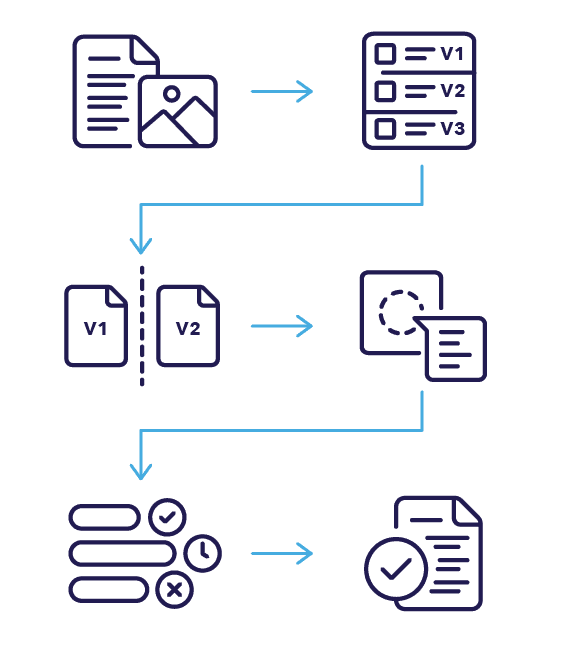
- Upload or Update an Asset
Admation automatically creates a new version, preserving all previous revisions in the repository. - View Full Version History
Teams can review timestamps, contributor details, notes and update descriptions in a single structured log. - Compare Versions Side by Side
Use the built-in comparison view to identify visual or textual differences instantly. - Apply Markups & Comments
Reviewers provide feedback directly on the latest version using integrated online proofing tools. - Track Revision Progress
Monitor change logs, approval pathways, checklist status and reviewer activity in real time. - Approve & Store for Audit
Once approved, the final version is logged in the audit trail with full version history for future reference and governance.
Use Cases
Marketing Teams
Ensure campaign assets use correct branding, up-to-date messaging and consistent visual standards.

Creative Agencies
Manage client revisions with full visibility into previous versions, feedback history and approval outcomes.

Digital & Social Teams
Track dozens of rapid iterations, banner variants and social content updates with precision.

Legal & Compliance Reviewers
Review historical changes, confirm accuracy across versions and validate updates with complete transparency.

Regulated Industries
Maintain audit-ready version history across finance, insurance, retail, healthcare and government marketing.

Challenges Version Management Solves
Version Confusion
Teams lose track of which file is correct when assets live across emails, drives and shared folders — creating errors, delays and duplicated production effort.
Untracked Changes
Without centralised Version Management, teams cannot see who updated an asset, what changed or why — leading to governance gaps and decision-making ambiguity.
Brand Inconsistency
Incorrect logos, colours, disclaimers or templates slip through when outdated versions circulate, risking off-brand content and compliance breaches.
Feedback Misalignment
Designers and agencies action outdated comments because previous versions aren’t preserved — resulting in unnecessary rework and slower delivery.
Compliance Exposure
Regulated industries require traceable revisions. Decentralised file locations offer no audit trail, increasing compliance risk and complicating regulatory review.
Duplicated Asset Creation
Teams recreate assets that already exist because earlier versions cannot be quickly located — wasting resources and slowing production timelines.
Stakeholder Miscommunication
Different departments and agencies use different file locations, creating misalignment and confusion about which version is correct.
Missed Approvals
Outdated or missing versions can lead stakeholders to approve incorrect files, delaying campaign launches and increasing operational risk.
Project Delays
Lack of centralised version tracking means teams waste time finding files, reconciling updates or confirming which version should move forward.