
Compare Versions: Clear, Accurate Artwork Review for Every Project
Creative assets typically move through multiple rounds of stakeholder feedback, updates and revisions. Without a structured way to compare versions, teams risk approving outdated files, missing changes or repeating feedback that should already have been actioned.
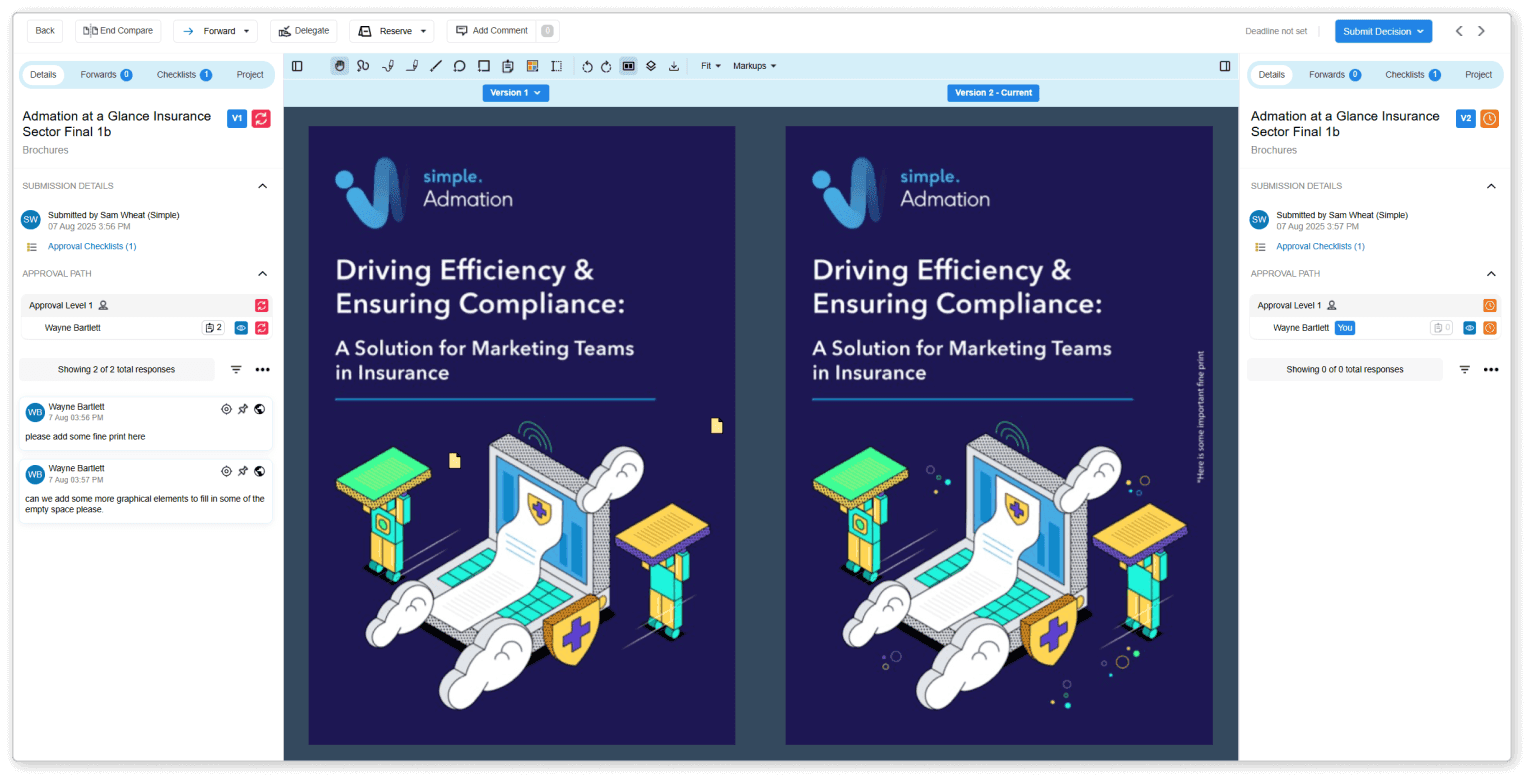
Admation’s Compare Versions feature provides a clean, side-by-side comparison view, showing exactly what changed between iterations, along with preserved comments, markups and version history. This gives teams complete clarity, speeds up approvals and improves collaboration across marketing, creative, brand and compliance stakeholders.
What Problems Do Compare Versions Solve?
Creative projects often move through multiple revisions, versions and stakeholder reviews. Without a structured way to compare versions side by side, teams lose visibility into what changed, which feedback was actioned, and whether updates align with brand, messaging or compliance requirements. Admation’s Compare Versions feature removes ambiguity, reduces errors and ensures every revision is assessed accurately and consistently.
- Unclear Revision Differences
Teams struggle to identify exactly what changed between versions, leading to confusion, rework and repeated questioning during review cycles. - Missed or Overlooked Feedback
Without side-by-side comparison, reviewers cannot easily confirm whether previous comments were actioned correctly, increasing the likelihood of repeated errors and extra revision rounds. - Slow, Inefficient Approvals
Reviewers waste time hunting for old files, searching email threads or opening multiple windows just to understand version progress — slowing down approvals and campaign delivery. - Inconsistent Review Decisions
When earlier versions aren’t visible during review, stakeholders make decisions without full context, resulting in inconsistent approvals, missed requirements and misalignment across teams. - Compliance Verification Challenges
Regulated content requires proof that claims, disclaimers and mandatory wording remain accurate across revisions. Without version comparison, compliance teams cannot easily validate changes. - Client or Stakeholder Misalignment
Clients and internal stakeholders often have different interpretations of what changed. Lack of visibility fuels confusion, unnecessary debates and extra feedback loops. - Difficulty Tracking Creative Progress
Teams cannot see how the asset evolved over time, making it harder to manage quality, track improvements or ensure the creative direction stays on brief.
What Is the Compare Versions Feature?
Admation’s Compare Versions feature allows reviewers to display two artwork versions side by side. Users can:
• Visually compare changes
• Check whether feedback was actioned
• Reference earlier rounds of comments
• Toggle through older versions
• Track how the asset evolved
• Ensure accuracy before approving
All historical versions remain preserved in Admation’s version history and audit trail, supporting strong governance, transparent workflows and regulated content controls.
Key Features
Side-By-Side Version Display
Review the current artwork next to previous versions in a single screen, making changes immediately visible and reducing time spent searching across separate files or folders.
Version Navigation Controls
Toggle through earlier revisions using intuitive arrows to see the full creative progression, ensuring teams understand how each change evolved from round to round.

Preserved Feedback & Annotation History
All comments, markups and reviewer notes remain attached to earlier versions, allowing reviewers to confirm whether feedback was actioned correctly and reducing repeat errors.

Markup Tools on the Latest Version
Apply new comments and annotations directly on the current version while referencing older versions side by side, improving accuracy and supporting clearer creative direction.

Contextual Access Control
Users only see the versions they were part of within the approval pathway, keeping the workspace organised, reducing noise and ensuring reviewers focus on relevant material.

Full Version Lifecycle Record
Every version remains stored in Admation’s approval history, providing a complete audit trail for internal teams, brand governance and compliance reviewers.

Key Benefits
Clearer Creative Decision-Making
Side-by-side comparisons give reviewers a precise view of what changed between versions, reducing ambiguity and enabling faster, more confident approval decisions across marketing, creative and compliance teams.
Fewer Missed or Repeated Amendments
Because all previous feedback remains visible, teams can easily confirm changes were implemented correctly, reducing repeated mistakes and avoiding unnecessary revision cycles across high-volume creative work.
Faster Approval Cycles
Reviewers no longer need to search through files, emails or folders to understand updates, helping marketing and creative teams progress assets through approval pathways more efficiently.
Improved Compliance & Brand Governance
Legal, compliance and brand reviewers can verify mandatory text, claims, disclaimers and brand elements across versions, reducing governance risk and strengthening audit-ready approval workflows.
Stronger Stakeholder Alignment
Marketers, creatives, agencies and compliance stakeholders all see the same updates at the same time, improving transparency, reducing miscommunication and keeping discussions focused and productive.
Reduced Rework & Higher Quality Output
Clear visibility into version changes helps teams deliver more accurate revisions, reduces duplicated feedback loops and supports consistent quality across multi-round, multi-channel creative projects.
How It Works
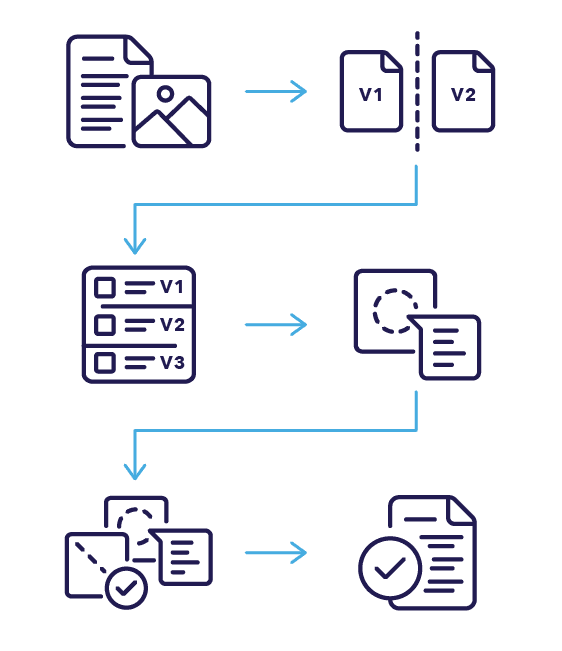
- Open the Artwork Under Review
Access the asset in Admation’s approval screen to begin comparison. - Select “Compare Versions”
Instantly display the current version beside an earlier version. - Toggle Across Revision History
Use arrow controls to move through older versions and view the asset’s progression. - Review Preserved Comments and Markups
Check previous annotations to confirm whether all feedback has been addressed. - Apply Feedback on the Latest Version
Add new comments, annotations or approval decisions while referencing previous rounds. - Return to Single View to Finalise Approval
Once comparison is complete, switch back and submit your decision confidently.
Use Cases
Marketing Teams
Ensure updates, messaging and brand details are correct across each revision while reducing review time.

Creative Agencies
Show clients exactly what was updated between versions to support clearer communication and faster client approvals.

Project Managers
Track progress through revision cycles and maintain schedule accuracy on multi-asset campaigns.

Compliance Reviewers
Validate regulated content across versions to confirm accuracy of claims, disclaimers and high-risk content.

Challenges Admation Compare Versions Solves
Change Visibility
Without structured version comparison, reviewers cannot clearly see what changed between iterations, leading to slow decisions, incorrect assumptions and repeated back-and-forth during creative approvals.
Feedback Tracking
Previous comments, markups and instructions become scattered across emails or PDFs, making it difficult for reviewers to confirm whether earlier feedback was fully actioned in the latest version.
Version Hunting
Teams spend excessive time searching through folders, email attachments and legacy files just to locate older artwork versions, delaying decisions and slowing approval cycles across campaigns.
Repeated Errors
When differences between versions aren’t obvious, the same mistakes are missed repeatedly, increasing rework, reducing creative accuracy and extending overall production timelines unnecessarily.
Stakeholder Alignment
Clients, approvers and internal reviewers often disagree about what changed when updates aren’t displayed side by side, resulting in misalignment, conflicting interpretations and delayed sign-off.
Compliance Oversight
Legal and compliance teams struggle to verify claim wording, disclaimers or regulatory details across revisions when changes cannot be compared visually, increasing governance and compliance risk.
Revision Uncertainty
Without preserved version history, reviewers aren’t confident whether a file reflects the latest approved changes, causing confusion, unnecessary queries and hesitation during approval decisions.
Decision Clarity
Teams lack visibility into why specific changes were made, who requested them and how revisions evolved — reducing confidence in final approvals and weakening audit readiness.