
Online Proofing: Clearer Feedback and Faster Creative Approvals
Marketing and creative teams often manage multiple review rounds, diverse stakeholders and tight deadlines. When feedback lives in inboxes or spreadsheets, teams face inconsistent comments, version sprawl and delays that slow campaign delivery.
Admation’s Online Proofing Tools streamline this process by providing a centralised environment for reviewing, marking up and approving creative assets. With visual annotations, version control and integrated collaboration, teams can provide accurate feedback, reduce rework and keep projects moving.
This feature is ideal for marketing teams, creative agencies, brand teams and compliance stakeholders needing clarity, efficiency and control over the creative review process.
What Problem Does Online Proofing Solve?
Marketing and creative teams manage large volumes of artwork, copy, digital assets and revisions across multiple stakeholders. Without a dedicated proofing and review environment, feedback becomes fragmented, approvals slow down and version accuracy becomes impossible to maintain.
Online proofing solves these issues by centralising comments, markups, version comparisons and approvals in one structured workflow.
Without online proofing, teams often face:
- Scattered and incomplete feedback
Comments arrive via email, PDFs, Teams chats, screenshots and spreadsheets — making it difficult to consolidate, track or action changes accurately. - Version confusion across tools
Assets stored across email chains, shared drives and desktops cause reviewers to evaluate outdated files, leading to rework and misalignment. - Slow and unclear review cycles
Manual coordination and back-and-forth communication delay approvals, especially when brand, legal and compliance must review the same asset. - Reviewers lacking shared visibility
Team members cannot see each other’s comments, resulting in duplicated, conflicting or incomplete feedback. - Compliance and governance gaps
Regulated industries require transparent, documented review histories. Email-based reviews cannot provide an audit-ready record. - High-volume review inefficiency
Fast-moving content production across channels is difficult to manage manually as workloads scale.
Admation’s Online Proofing Tools create a single source of truth for feedback, markups, version comparison and approvals — reducing rework, improving accuracy and accelerating delivery.
What Is the Online Proofing Feature?
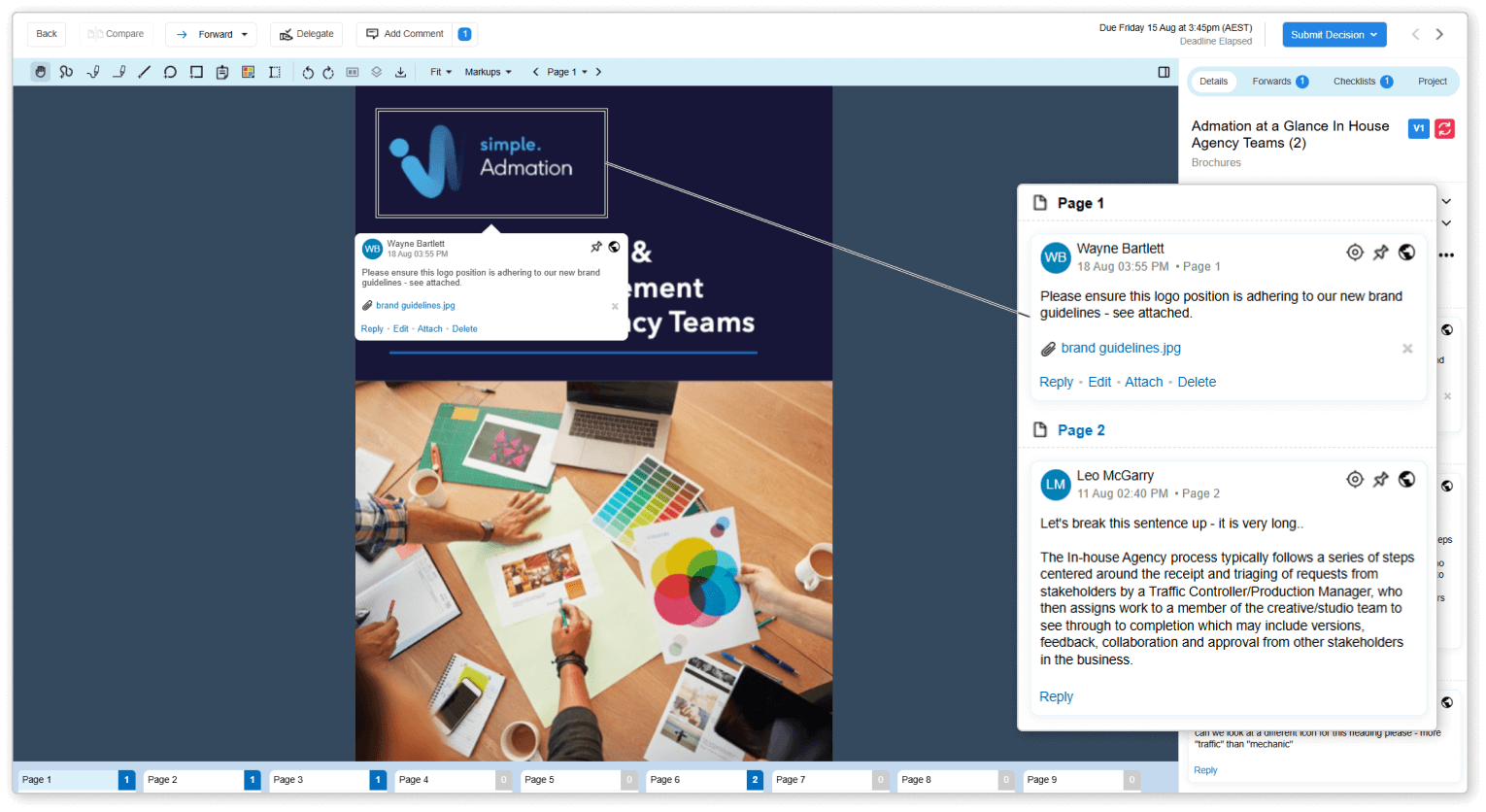
Online Proofing enables reviewers to annotate creative assets, share feedback, compare revisions and submit approvals within a single, centralised interface. All actions are recorded as part of the approval history, ensuring transparency and alignment across all stakeholders.
Admation supports a wide range of file types — including PDFs, images, videos, HTML/web previews and documents — making it suitable for multi-channel marketing and creative production.
Key Features
Approval Centre
A modern, distraction-free interface that maximises artwork visibility and helps reviewers focus purely on the creative. This improves clarity and accelerates decision-making in fast-paced review cycles.

Unified Proofing Toolbar
All essential tools — zoom, rotate, annotate, compare — sit at the top of the screen for simple, intuitive access. This reduces learning curves and minimises reviewer errors.

Smart Sidebar with Review Context
Approval paths, forwarded comments, checklists and metadata appear in structured sidebar tabs, giving reviewers all necessary context without leaving the screen.

Advanced Compare Modes
Four comparison modes — side-by-side, swipe, overlay and pixel contrast — make it easy to identify subtle changes, confirm corrections and prevent missed edits.
Sticky Notes & Quick Feedback Tools
Drop notes anywhere on the artwork without drawing shapes. Ideal for rapid comments, cross-functional feedback and high-volume reviews.

Precision Text Selection
Highlight and comment on specific words or sentences inside artwork — essential for legal, regulatory and claim-based content reviews.

Markup List with Filters
All markups appear in a unified list with filters by user, role or comment type. This eliminates duplication and helps isolate compliance-critical feedback.

Multi-Format Proofing Support
Review PDFs, video frames, images, HTML, documents and digital assets in one place — supporting omnichannel creative production.

Integrated Approval Actions
Approve, request changes or forward items directly within the proofing screen, keeping the workflow moving without manual handovers.

Version & Feedback History
Every comment, markup and past version remains accessible throughout the approval process, supporting transparency and compliance.

Key Benefits
Clear, Actionable Feedback
Visual annotations and threaded comments make feedback easy to understand and action, reducing ambiguity and supporting faster revisions.
Fewer Revision Rounds
Stakeholders see each other’s comments, preventing duplication, contradiction and confusion — significantly lowering revision volume.
Faster Approval Cycles
Centralised feedback, version clarity and real-time collaboration remove the manual coordination that typically slows marketing approvals.
Improved Compliance and Governance
Each version, comment and approval is logged for audit readiness, supporting regulated teams that require strong documentation.
Enhanced Team Collaboration
Marketing, brand, creative, legal and compliance teams work in one central environment with shared visibility into feedback and decisions.
Greater Control Over Creative Workflows
Version history, status tracking and a structured proofing flow help teams identify bottlenecks early and keep campaign timelines on track.
How It Works
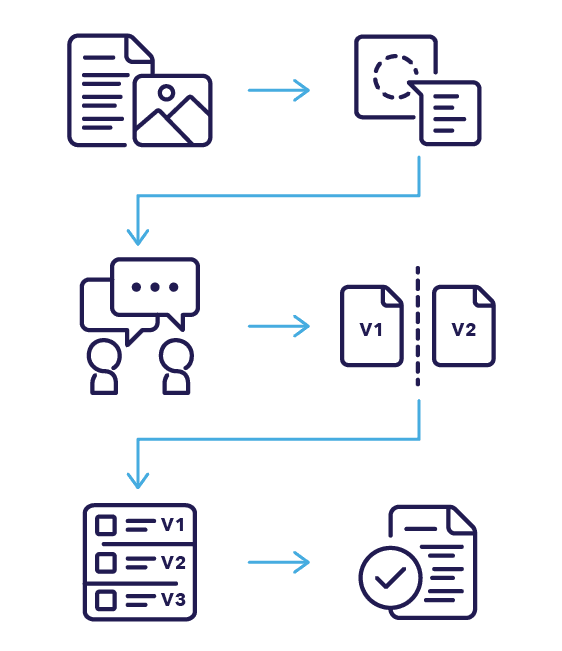
- Upload Creative Assets
Add artwork, documents, video frames or digital assets for review. - Apply Markups and Comments
Use intuitive tools to annotate, highlight issues and add feedback directly on the asset. - Collaborate in Real Time
Reviewers reply to comments, clarify instructions and view contextual discussions. - Compare Versions Side-by-Side
Switch between earlier versions to confirm updates and ensure accuracy. - Review Full Revision History
Access comments, changes and decisions across all versions, supporting compliance and accountability. - Approve or Request Changes
Submit decisions directly from the proofing view, triggering the next stage in the approval workflow.
Use Cases
Marketing Teams
Review campaign materials, content, ads and digital assets with full visibility.

Creative Agencies
Provide clients with a structured approval process free from email chains.

Digital & Web Teams
Review web designs, UI layouts, banners, animations and HTML previews.

Brand Teams
Verify brand accuracy, messaging and creative consistency.
Compliance Reviewers
Evaluate claims, disclaimers or regulated content with full visibility of previous feedback.

Challenges Online Proofing Tools Solve
Scattered Feedback
Feedback arrives through emails, PDFs, chats and screenshots, making it difficult for teams to consolidate comments, track decisions or maintain a clear review history.
Version Confusion
Multiple versions circulate across email threads and shared folders, causing reviewers to assess outdated files and leading to avoidable rework and misaligned decisions.
Conflicting Comments
Reviewers cannot see each other’s annotations, resulting in duplicated, unclear or contradictory feedback that slows the approval process and frustrates design teams.
Unclear Changes
Designers struggle to confirm whether requested updates were implemented correctly when feedback history is fragmented and there’s no structured proofing record to reference.
Slow Approval Cycles
Manual coordination, unclear responsibilities and inconsistent reviewer input extend approval timelines, especially when many stakeholders need to participate.
Low Visibility
Reviewers lack shared visibility of what was said, by whom and when — reducing accountability and increasing the risk of missed or incomplete feedback.
Disjointed Tools
Teams review assets in different tools and formats, resulting in fragmented workflows that slow collaboration and complicate multi-stakeholder review cycles.
High-Volume Inefficiency
Large content volumes, rapid iterations and multi-channel deliverables overwhelm manual proofing methods, limiting a team’s ability to review at scale.
Compliance Exposure
Regulated industries need auditable records of decisions, reviewers and changes. Email-based feedback cannot provide reliable documentation or meet governance standards.
Rework Escalation
Unclear, incomplete or misplaced comments lead to repeated errors, additional revision rounds and unnecessary delays in campaign delivery.